Follow this guide to check and use checksum calculation for Xhorse Multi Prog Programmer.
Process:
Step 1: Keep Your Multiprog Software Updated
Ensure you are using the latest version of Multi-prog for optimal functionality and support.

Step 2: Navigate to Supported ECUs
Open the Device Library in Multi prog.
Browse the list under the [Devices] menu.
Identify supported ECUs by locating a small green [C] symbol next to EEPROM or Flash entries
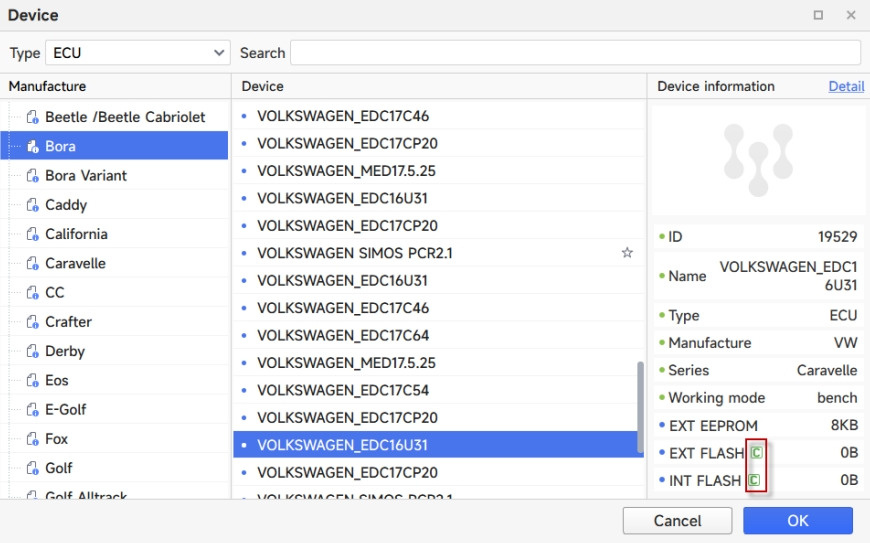

Step 3: Confirm Support in Main Interface
In the main program interface, verify that the same green [C] appears beside EEPROM or Flash for your selected ECU/file.

Step 4: Perform Checksum Calculation (If Supported)
Select a supported ECU/file.
Click [Write to ECU].
A prompt will appear—choose whether to enable verification.
If you select [Verify], the process may take several minutes. Results will be displayed upon completion.


Step 5: Note on Real-World Testing
Important: Checksum verification in Multi-prog has not yet been validated in actual vehicle testing. Final performance should be confirmed in a real-world environment.
Step 6: Contact Support for Unsupported ECUs
If checksum calculation is unavailable for specific ECUs, submit a request to Xhorse Support for further assistance. Await their response for future updates or solutions.
Contact us:
Email: Sales@xhorseTool.com
Skype: VVDI2shop.com
Whatsapp: +8613343421783